Best AI Landscape Design Tools in 2026 (From a Photo of Your Yard)
6 AI landscape and garden design tools compared: AI Kitchen Redesign, REimagineHome, GenRoom, DecorAI, Spacely AI and Interior AI. Free trials, sign-up and pricing, checked October 2026.
Disclosure: This list is written by the AI Kitchen Redesign team, and our tool is one of the six. We have not run side-by-side quality tests, so we do not rank image quality. Facts come from each company's own website, checked October 2026. Confirm prices on each site before you pay.
Quick answer: For a free AI garden redesign from a photo with no sign-up, try AI Kitchen Redesign's landscape tool: two designs in about 30 seconds, with your house, fences and property lines kept in place. Spacely AI gives 40 free trial credits with watermark-free, commercially licensed results. REimagineHome gives 5 free designs and offers landscaping, hardscaping, lawn replacement and pools. GenRoom includes yard design in every one-time pack. DecorAI lists 54 garden styles. Interior AI has outdoor garden, patio and pool room types on plans from $49 a month.
How do they compare?
| Tool | Free to try | Sign-up / card | Paid from | Outdoor features |
|---|---|---|---|---|
| AI Kitchen Redesign | 2 designs + 3 after Google sign-in | No sign-up for the first 2 | $9.99 one-time for 50 images | 8 garden styles; keeps house, fences and property lines |
| Spacely AI | 40 trial credits | Account | Paid tiers; Education $30 | Creative Landscape and Exterior tools; Free plan listed as watermark-free with commercial license |
| REimagineHome | 5 free designs | No credit card | Monthly plans | Landscaping, hardscaping, lawn replacement, add a pool, day to dusk |
| GenRoom | 6 credits at sign-up | Account | $9.99 one-time for 36 credits | Yard and facade design in every plan |
| DecorAI | 3 designs, 1-day trial | Account and card | $24 / month | 54 garden and 67 exterior styles |
| Interior AI | Not stated | Account | $49 / month ($29 yearly) | Outdoor garden, patio, pool area and house exterior |
From each tool's website, checked October 2026.
1. AI Kitchen Redesign: best for a quick free garden preview
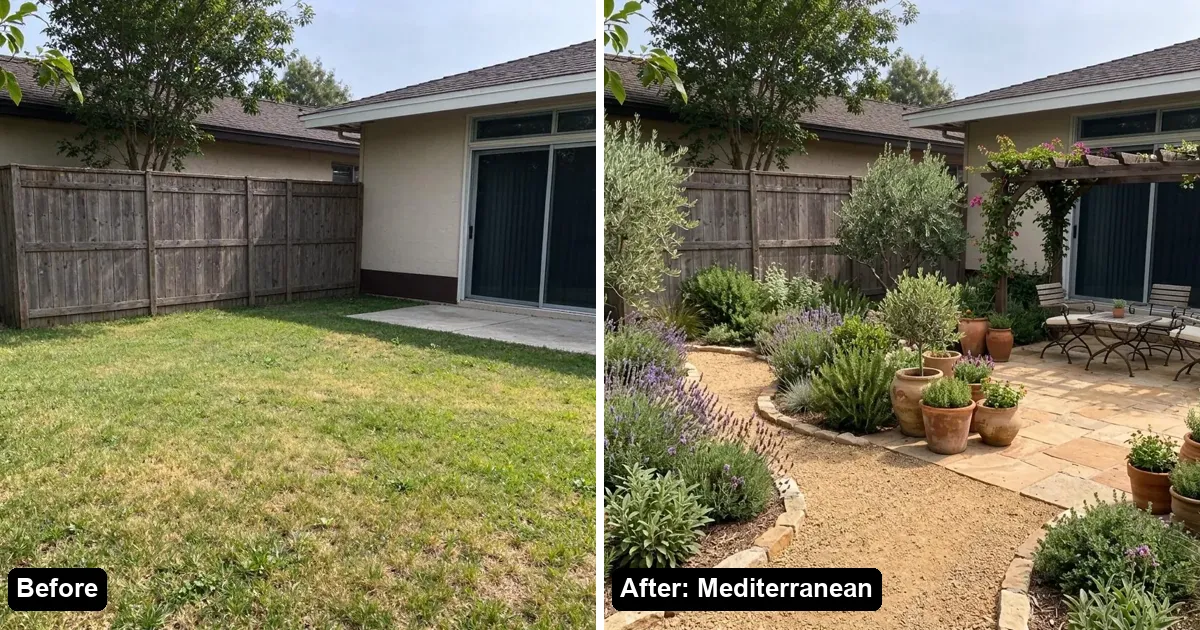
Upload a photo of your front yard, backyard, patio or side yard and pick a style: Modern, Japanese Zen, Mediterranean, English Cottage, Drought-Tolerant, Tropical, Rustic Farmhouse or Minimalist. You get two options in about 30 seconds, and the house, fences and property lines stay where they are.
- Free: 2 designs with a small watermark, no account; 3 more after Google sign-in.
- Paid: one-time packs from $9.99 for 50 images that never expire; monthly plans from $14.99.
2. Spacely AI: best for designers who need a free commercial license
Spacely's Free plan includes 40 trial credits and is listed as watermark-free with a commercial license. It offers Creative Landscape and Creative Exterior tools alongside interiors, with Personal, Studio and Agency plans for teams.
3. REimagineHome: best for hardscape and pool ideas
REimagineHome lists landscaping, hardscaping, lawn replacement, adding or retreating a pool, exterior structures and day-to-dusk renders. You get 5 free designs with no credit card, then monthly plans.
4. GenRoom: best for one-time packs covering house and yard
GenRoom includes interior, facade and yard design in every plan. Packs are one-time (Start $9.99 for 36 credits up to Pro $39.99 for 300) and credits last 180 days. Free results are watermarked until you buy.
5. DecorAI: best for the widest garden style list
DecorAI lists 54 garden styles and 67 exterior styles. The 1-day trial includes 3 designs but asks for a card; the plan is $24 a month after, with a 30-day money-back guarantee.
6. Interior AI: best for high-volume pro work
Interior AI offers outdoor garden, outdoor patio, pool area and house exterior among its room types. Plans start at $49 a month ($29 a month billed yearly) for 1,000 designs. A free trial is not mentioned.
Tips for a better AI yard redesign
- Shoot from a corner of the yard so the house and the fence line are both visible.
- Take the photo in daylight, without harsh midday shadows if possible.
- Keep the whole lawn or patio in the frame so the AI knows how much space there is.
- Treat results as ideas, not planting plans: check plant hardiness and local rules with a nursery or landscaper.
FAQ
Is there a free AI landscape design tool?
Yes. AI Kitchen Redesign lets you try two designs with no account. Spacely (40 credits) and REimagineHome (5 designs) also have free tiers after sign-up.
Can AI design my backyard from a photo?
Yes. Upload a photo of your backyard and pick a garden style; the AI redraws plants, paths, patios and lighting on your real yard.
Will the AI move my house or fence?
AI Kitchen Redesign is built to keep the house, fences and property lines in place. If a result moves them, you can claim the image back and get a redo.
Which AI landscape tool has no subscription?
AI Kitchen Redesign and GenRoom sell one-time packs. The others are mainly monthly plans.