Can ChatGPT Redesign My Kitchen From a Photo?
ChatGPT can restyle a kitchen photo, but it often moves windows and changes the room. Here is when a chat tool is enough and when a layout-aware kitchen tool works better.
Written by the AI Kitchen Redesign team. We make one of the tools discussed below.
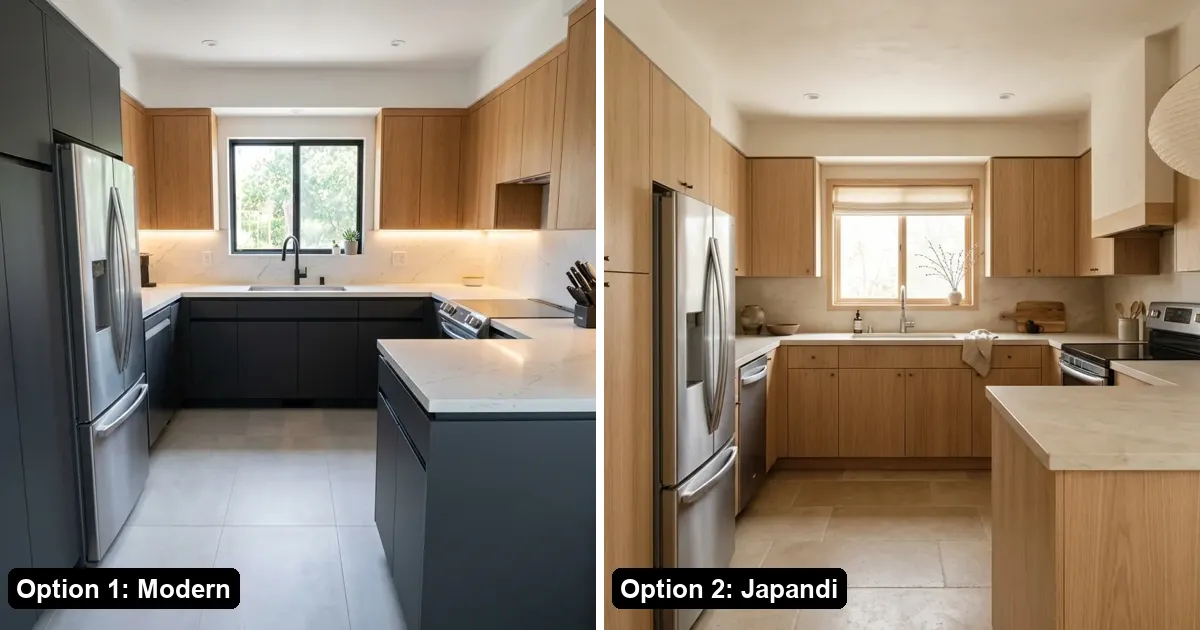
Quick answer: Yes, ChatGPT and Gemini can take a photo of your kitchen and generate a redesigned version from a text prompt. They are good for quick mood boards. The common problem is that general chat tools are not built to keep your layout: windows can move, the camera angle can shift, and the cabinets can end up in a different place. If you want a preview of your own kitchen with the same walls and windows, a dedicated tool like AI Kitchen Redesign adds layout rules, one-click styles and materials, two options per try with a before/after slider, and a refund if the layout drifts.
What does ChatGPT do well for kitchen ideas?
- Brainstorming: describing styles, color palettes and material pairings in words.
- Mood images: generating inspiration pictures quickly from a prompt.
- Explaining trade-offs: for example quartz vs butcher block, or painted vs wood cabinets.
If you only want inspiration, a chat tool is a reasonable place to start.
Where do chat tools fall short for a real remodel?
- Layout drift: a window gets wider, a wall disappears or the island moves. The picture looks nice but is no longer your kitchen.
- Long prompts: you have to describe every material and remind it to keep the layout each time.
- One image at a time: comparing directions means rerunning and saving images yourself.
- No safety net: if the result is unusable, there is nothing to claim back.
How is a dedicated kitchen AI tool different?
| General chat tool | AI Kitchen Redesign | |
|---|---|---|
| Keeps walls, windows and camera angle | Not by design; depends on the prompt | Built-in layout rules on every generation |
| Choosing a look | Write a prompt | One click: 8 styles plus materials and colors |
| Options per try | Usually one image | Two redesigns in about 30 seconds |
| Comparing | Save and flip images yourself | Drag a before/after slider |
| Change one thing only | Prompt and hope | "Change one thing": cabinets, countertop, floor or wall color |
| If the layout drifts | No recourse | Claim the image back and get a stricter redo (up to 3 a day) |
| Price to try | Depends on your chat plan | First 2 designs free, no sign-up |
When should I use which?
- Use a chat tool for early inspiration, words and mood boards.
- Use a kitchen tool when the picture needs to be your real room: choosing between cabinet colors, showing a contractor, or deciding whether a style suits your window and ceiling.
Many people use both: brainstorm in a chat, then test the shortlisted ideas on their own photo.
How do I try it on my own kitchen?
- Take a photo from the doorway or a corner, in daylight.
- Upload it on aikitchenredesign.com and pick a style, or choose Change one thing.
- Compare the two results with the slider and download the one you like.
Step-by-step guide: How to remodel a kitchen from a photo with AI.
FAQ
Can ChatGPT redesign a kitchen from a photo?
Yes, it can generate a restyled image from your photo and a prompt. It does not guarantee that walls, windows and the camera angle stay the same.
Why does ChatGPT change my windows?
General image models redraw the whole scene. Without strict layout rules they may change proportions or move features while following your style request.
Is AI Kitchen Redesign free?
Yes to try: two watermarked designs with no account, and three more after Google sign-in. Paid packs start at $9.99 for 50 images.
Can I use both?
Yes. Use a chat tool for ideas, then test the ideas on your own photo with a layout-aware tool.