How to Remodel a Kitchen From a Photo With AI (Keep Your Layout)
Upload a kitchen photo, pick a style, and get two layout-safe redesigns in about 30 seconds. Free to try with no sign-up. Walls and windows stay put.
Quick answer: To remodel a kitchen from a photo with AI, upload a clear photo of your kitchen to AI Kitchen Redesign (aikitchenredesign.com), choose a style (or materials and colors), and generate. In about 30 seconds you get two photorealistic redesigns of the same room. Walls, windows, doors and camera angle are meant to stay put; only finishes, colors, fixtures and furniture change. The first try is free with no sign-up (two designs with a small watermark).
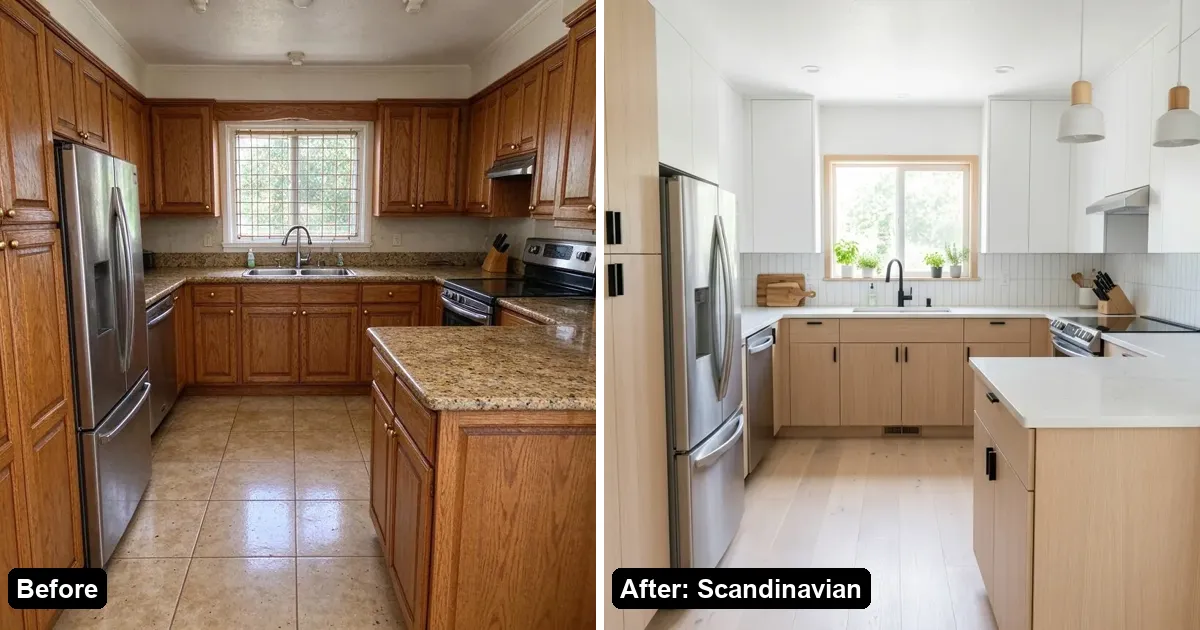
What does an AI kitchen remodel from a photo actually do?
An AI kitchen redesign tool takes one photo of your current kitchen and redraws how it could look after a remodel—new cabinets, counters, floors, paint and styling—while keeping the structure of the room.
You typically choose:
- A photo of your kitchen (JPG, PNG, WebP or iPhone HEIC on AI Kitchen Redesign).
- A direction: a ready-made style such as Modern, Scandinavian, Japandi, Industrial, Rustic Farmhouse, Minimalist, Coastal or Mid-Century, and optional materials or colors.
- Or “Change one thing” only—cabinets, countertop, floor or wall color—when you do not want a full restyle.
The point is a visual concept you can share with family or a contractor, not a construction drawing, measurement set or quote. AI Kitchen Redesign’s Terms and homepage say results are visual concepts, not construction drawings.
How do I remodel my kitchen from a photo step by step?
Step 1: Open the tool and upload your kitchen photo
Go to aikitchenredesign.com in a web browser. No app install is required. Upload a clear photo of your kitchen. Supported formats include JPG, PNG, WebP and iPhone HEIC.
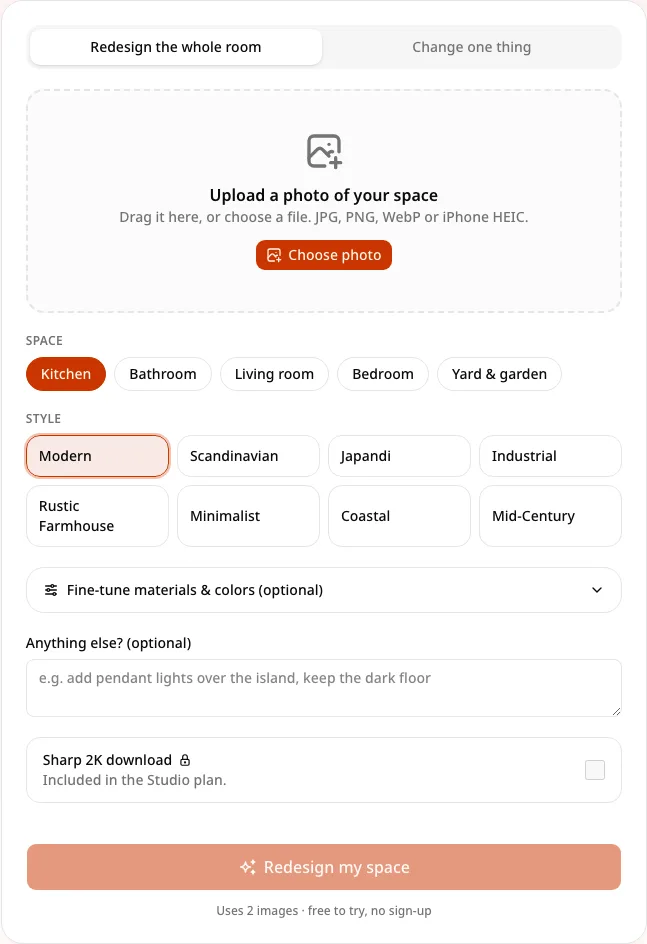
Step 2: Pick a style—or change only one area
- Full redesign: choose a style (Modern, Scandinavian, Japandi, Industrial, Rustic Farmhouse, Minimalist, Coastal, Mid-Century) and optionally tune materials and colors.
- Change one thing: pick cabinets, countertop, floor or wall color when you only want to preview one finish (see Change only kitchen cabinets with AI).
Step 3: Generate and wait about 30 seconds
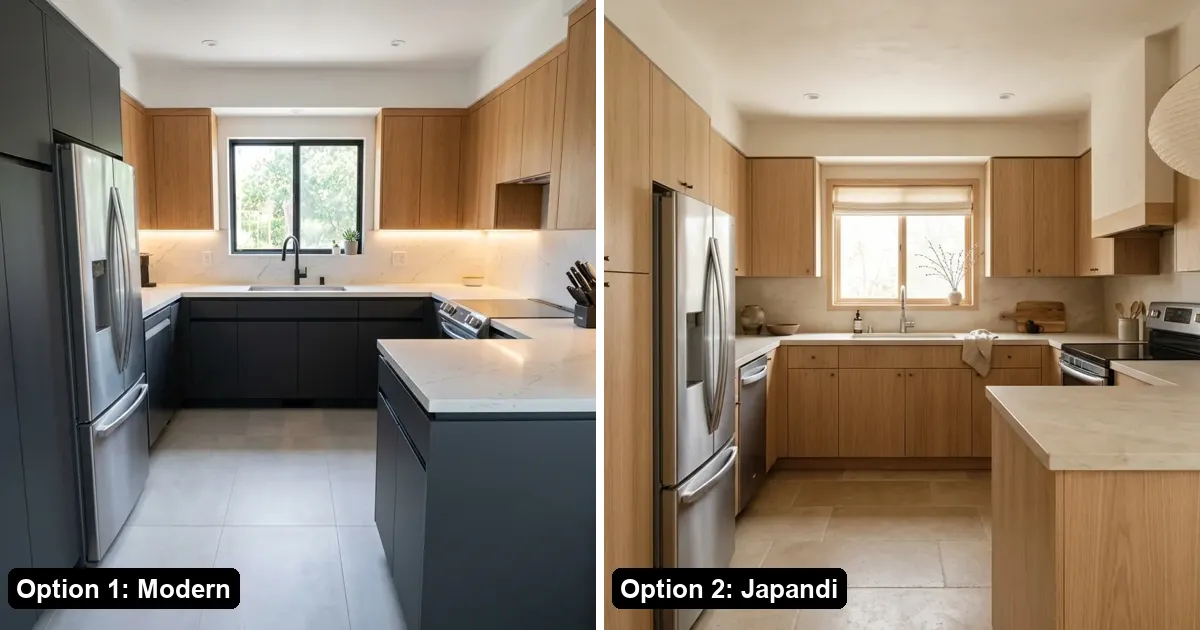
A full redesign produces two images and uses two image credits. “Change one thing” produces one image. Failed generations are refunded automatically.
Step 4: Compare with the before/after slider and download
Drag the before/after slider to check that walls and windows stayed put. If the AI moved walls or windows, use the on-image claim (“AI moved my walls or windows”) for a refund and redo under stricter rules (up to about 3 claims per day, per the site’s refund FAQ).
How do I keep my layout, walls and windows?
Layout-lock is the product focus of AI Kitchen Redesign: the model is guided to keep walls, windows, doors and camera angle, and change finishes instead. That matters when you want to show a remodel of your kitchen, not a fantasy room with different windows.
Tips that help:
- Photograph from a corner or doorway so the full run of cabinets and windows is visible.
- Use even daylight; avoid heavy flash glare on glossy cabinets.
- Don’t crop out the sink, range or island if those landmarks define the layout.
- If a result drifts, claim the layout refund rather than burning more credits on the same bad direction.
What styles and rooms can I try?
Kitchen styles on the site: Modern, Scandinavian, Japandi, Industrial, Rustic Farmhouse, Minimalist, Coastal, Mid-Century.
Space types on the same product: Kitchen, Bathroom, Living room, Bedroom, Yard & garden—via the homepage and dedicated tool pages for bathroom, room and landscape.
How is this different from asking ChatGPT or Gemini?
General chat image tools can invent a pretty kitchen, but they often move walls, change window sizes or invent a different footprint. A dedicated kitchen tool like AI Kitchen Redesign adds layout rules, one-click styles and materials, two options plus a before/after slider, detail edits (“Change one thing”), and a refund path when layout drifts. Use chat tools for mood boards; use a layout-aware photo tool when the photo must still be your kitchen.
Is it free, and what happens to my photos?
Free: first try = 2 designs with a small watermark, no account; Google sign-in adds 3 more free images. No credit card on the free trial. Details: Is AI Kitchen Redesign free? and pricing.
Paid (as of October 2026): one-time Starter $9.99 / 50 images and Value $39.99 / 300 images (never expire, no watermark); monthly Pro $14.99 / 200 images and Studio $29.99 / 600 images (Studio adds sharp 2K downloads that count as 2 images each, plus a commercial license). Monthly images do not roll over.
Privacy (from the privacy policy): photos are private to your account; optional share links; deletable; not sold and not put in public galleries; processed via Kie.ai; stored in Cloudflare R2; payments by Stripe; Google sign-in. Do not upload photos of people (especially children). Contact: yaohongan20@qq.com.
What are the limits?
- Results are visual concepts, not construction drawings, measurements or contractor quotes.
- AI can still make mistakes; always check walls, appliances and details before ordering materials.
- Free / Starter / Value / Pro are for personal, non-commercial use (sharing with family or a contractor is fine). Studio includes commercial use for proposals, listings and marketing, and Acceptable Use asks you to label AI concepts appropriately.
- Ages under 13 are not supported; avoid photos with people.
FAQ
Can I remodel a kitchen from a phone photo?
Yes. Upload a phone photo (including iPhone HEIC) to AI Kitchen Redesign and generate two redesigns in about 30 seconds.
Will AI keep my kitchen layout?
AI Kitchen Redesign is built to lock walls, windows, doors and camera angle. If a result moves them, claim a refund and redo under the layout claim.
Do I need design software or a floor plan?
No. You start from a photo—no CAD, floor plan or measuring required for a visual preview.
Can I change only the cabinets?
Yes. Use “Change one thing” and select cabinets (or countertop, floor or wall color).
Is AI kitchen redesign free?
Yes to try: 2 watermarked designs without an account, plus 3 more after Google sign-in. Paid packs and plans remove the watermark and add more images.
Can contractors or realtors use the images commercially?
Commercial license is included on Studio. Other plans are personal use; sharing concepts with a contractor for a personal remodel is allowed.